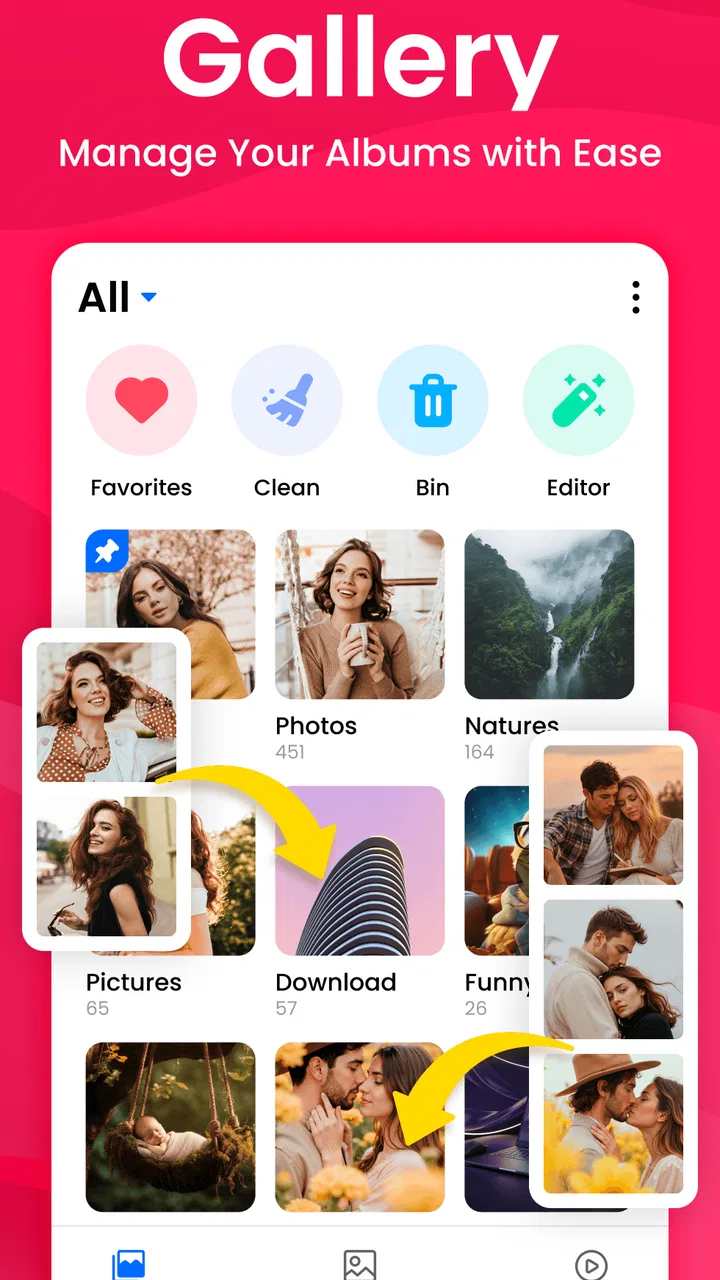
Gallery - Photo Gallery
- 4.6
- Rating
- 100.00K
- Installs
- Free
- Price

 Analysis by App-foxy
I tend to judge a gallery app by what happens after the first launch, not by how attractive its icon looks. A photo manager earns its place when I can find a recent picture quickly, separate personal images from screenshots, and recover from a messy folder without turning the process into another chore. Gallery - Photo Gallery, made by GymMusic Studio, takes a straightforward approach to that everyday problem: it is a free photography app for organizing photos and videos and creating folders.
After using it as a simple library rather than expecting a full editing suite, I found its appeal easy to understand. It is aimed at people who want a cleaner way to browse media already stored on a phone. The interface idea is familiar, which is useful when I am in a hurry, but that simplicity also means I would not choose it for advanced cloud management, professional cataloging, or heavy photo editing. Its strongest role is basic local organization with less visual clutter.
Where the first setup can become confusing
The first point I would check is whether the app can actually see the media I expect. A gallery cannot display images that the operating system has not made available to it, and a blank or incomplete view does not automatically mean the app has lost anything. I would begin by checking that the photographs are present in the phone’s normal file or media browser, then reopen Gallery - Photo Gallery after confirming that the device is running at least Android 8.0.
You May Also Like

 AccuWeather: Weather Radar
AccuWeather Review: A Quick, Clear Forecast for Everyday Decisions
For everyday plans, the best forecast is the one you can understand quickly. AccuWeather makes rain timing, radar, and local conditions easy to act on, with a few trade-offs.

 Hill Climb Racing
Why Hill Climb Racing Still Turns Crashes Into One More Run
A tiny car, a bumpy hill and one more upgrade: Hill Climb Racing keeps resurfacing because its simple chaos makes every near-miss feel personal.

 AliExpress - Shopping App
AliExpress Makes Global Shopping Feel Personal, but Shoppers Bear the Risk
AliExpress turns a global marketplace into a pocket-sized discovery engine. Its reach is useful, its shopping loop compelling, and its trade-offs easy to miss.

 Lords Mobile: Kingdom Wars
Lords Mobile Is a Kingdom-Building Routine, Not a Quick Match
A case-by-case verdict on the building, battles, device demands, and social commitments that make Lords Mobile rewarding for some players and exhausting for others.

 PDF Scanner app - TapScanner
TapScanner Makes Paperwork Easier to Capture, Check, and Share
TapScanner makes scanning with a phone feel less like a rescue operation and more like a dependable step in getting work done. Its capture tools are useful, though not flawless.

 Block Blast!
 Shows How Much a Puzzle Game Can Leave Out
A quiet grid game shows why puzzle players increasingly value instant clarity, repeatable skill and low-pressure play—and where the genre still needs to catch up.
More From Our News Desk
View All News


That simple check prevents a common mistake: treating an indexing delay, a hidden folder, or a disconnected storage location as an app failure. If the pictures appear elsewhere but not here, I would avoid immediately deleting and reinstalling the application. First, I would close it normally, open it again, and give the phone a moment to refresh its media library. The safest troubleshooting habit is to change one thing at a time so I know what actually solved the problem.
Folder creation is another place where expectations matter. The app’s purpose includes creating folders, but a folder is most useful when I decide on a naming system before moving anything. For example, I might use broad groups such as “Receipts,” “Trips,” and “Family,” rather than making a new folder for every single event. That keeps the library manageable and makes the organization benefit visible after a few weeks instead of producing dozens of tiny destinations.
I also recommend starting with a small batch. Moving a handful of images into a new folder lets me confirm that the workflow behaves as expected before I reorganize an entire camera library. This is a practical safeguard because a large cleanup is harder to reverse mentally, even when the original files remain on the device. I prefer to test with copies or non-critical images whenever the phone’s file structure is unfamiliar.
Checks that save time before organizing
Before I begin, I look at three things: whether the media opens normally in another viewer, whether the phone has enough free space for routine system work, and whether the images are stored locally rather than on a temporarily unavailable location. These are not special requirements of this particular app; they are sensible checks for any Android gallery. They help separate an app issue from a device issue before I spend time rebuilding folders.
The app is free and carries an Everyone age rating, so it is approachable for a shared household device or for someone who does not want a complicated photography tool. Still, “easy to use” does not mean every phone will present media identically. Manufacturers can arrange folders differently, and Android’s own media handling may affect when new pictures appear. I would judge the app after testing one new image, one video, and one existing folder rather than relying on a single empty screen.
Gallery - Photo Gallery was released on January 6, 2026, and its current version is 2.1. That makes it sensible to keep the installed version current when a problem appears, but I would not assume an update alone fixes every problem. If a particular video fails across multiple gallery apps, the file may be damaged or encoded in a way the phone struggles with. If every image is missing only here, then the troubleshooting path should focus on the app’s visibility of the media library.
A recovery workflow for missing or misplaced media
When a picture seems to have disappeared, I use a calm sequence instead of repeatedly tapping buttons. First I search for the same image in the phone’s broader file or media tools. Next I check whether it was placed in a different folder, especially if I recently moved or renamed items. Then I reopen the gallery and test a newly created photo. That last step is useful because it distinguishes older indexing trouble from a general inability to detect new media.
If only one folder is absent, I would inspect that folder directly and confirm that it contains supported photos or videos rather than unrelated documents. If an entire library is absent, I would restart the phone before attempting more disruptive steps. A restart can clear a temporary media-scanning problem without touching personal files, whereas clearing app storage or uninstalling an app deserves more caution because those actions can affect local organization or settings.
My practical rule is to protect the original files before attempting a major cleanup. I would not use a gallery as the only place where important memories exist. For valuable photos, I keep a separate copy through whatever backup method I already trust. That is especially important when moving media between folders: organization should reduce confusion, not become the only safeguard against accidental loss.
Videos deserve their own test because they often expose problems that still images do not. I would open a short, recently recorded video and an older clip. If both work, I would then investigate the specific file that fails. If neither works, I would check the phone’s available space, restart it, and compare playback in another installed player. This approach avoids blaming Gallery - Photo Gallery for a file or device limitation it may not control.
Building a workflow that stays tidy
The best use I found for the folder feature is a small, repeatable routine. After a weekend away, I might create one folder for the trip, move only the strongest images and useful videos, and leave temporary screenshots out of that collection. For household paperwork, I would create a receipts folder and use it as a holding area until the documents are no longer needed. The point is not to classify every file perfectly; it is to make the next search faster.
I would also avoid overly deep folder structures. A path that requires opening several nested folders is slower than a simple top-level arrangement, particularly on a phone used one-handed. If I need both date and subject, I would choose the priority that matches my real searches. Someone who asks “What did I photograph last month?” may benefit from date-based folders, while someone who asks “Where is my passport scan?” needs subject-based organization.
Another useful habit is to separate temporary media from permanent media. Screenshots, downloaded images, and pictures awaiting a decision can overwhelm a gallery even when the camera photographs are well organized. A temporary folder gives me a review point: I can delete, move, or keep items later rather than allowing them to mix with important memories. This is a workflow advantage, not a flashy feature, but it is where a basic gallery can become genuinely useful.
I would test the arrangement on the phone’s normal browsing screen after creating it. If the new folders are easy to recognize and the thumbnails make sense, the system is working. If I keep opening the wrong folder, the naming scheme is too vague. Names such as “Important,” “Misc,” and “New” tend to lose meaning quickly; a specific label like “2026 school forms” or “Kitchen measurements” gives the folder a clear purpose without requiring a complicated catalog.
When the app is not the cause
Not every missing thumbnail, slow load, or failed video points to Gallery - Photo Gallery. A phone that is nearly full may behave unpredictably, and a damaged file can fail in several apps. Storage locations can also become unavailable after a device change or a removable card problem. In those cases, reinstalling the gallery is unlikely to repair the underlying media.
I would compare symptoms rather than guessing. If the same image opens in another viewer, the issue is more likely related to how this gallery is reading or grouping it. If it fails everywhere, I would preserve the file and investigate the file itself or the storage location. If only recent photos are missing, I would check whether the camera saved them somewhere different from the folder I am browsing. These comparisons are quick and much more informative than repeated force-closing.
There is also a difference between organization and backup. This app is useful for browsing and arranging media, but I would not treat a folder as a cloud copy or an automatic recovery plan. Users who need synchronized access across several devices, shared albums, extensive search, or editing controls may be happier with a larger ecosystem built around those needs. A dedicated cloud service can be the better choice when the priority is access from multiple devices rather than local simplicity.
Likewise, professional photographers may find a basic folder workflow too limited. Their needs can include non-destructive editing, detailed metadata, color management, ratings, and a carefully controlled archive. Gallery - Photo Gallery makes more sense for ordinary phone libraries, family images, downloaded media, and practical document snapshots. I would skip it if I wanted a complete creative studio or a specialized digital asset manager.
How it compares with the usual gallery choices
The default gallery on many Android phones has one major advantage: it is already integrated with the device and often understands the manufacturer’s camera folders immediately. If that built-in app already gives me the sorting and folder control I need, switching may not produce a dramatic improvement. Gallery - Photo Gallery is more appealing when the default experience feels crowded, inconsistent, or difficult to use for a simple folder-based routine.
Cloud-focused photo services usually win at automatic backup, cross-device access, and search based on dates or visual content. Their trade-off is that they can feel broader than necessary when I only want to arrange local files. This app’s narrower purpose is its benefit for a user who wants a direct, phone-centered library without building a larger online workflow around every image.
File managers offer deeper control over names, locations, and non-media documents, but they are often less pleasant for browsing a collection of photographs. I would use a file manager when I need to inspect exact storage paths or handle unusual file types, then return to a gallery for visual review. That combination is more practical than expecting one tool to be ideal for both detailed file operations and comfortable photo browsing.
The app has reached over one hundred thousand installs and holds a 4.5 average from around one thousand two hundred ratings. Those figures suggest that many people find the basic concept useful, but they do not remove the need to test it against a particular phone’s storage layout. I read that reception as encouragement to try it, not as a guarantee that it will replace every built-in or cloud-based option.
Who will get the most from it
I would recommend it to someone who has accumulated photos and videos but wants a less complicated way to separate them. It suits a person who thinks in folders, prefers local browsing, and values a free tool over a large collection of editing or sharing features. It can also work well on a family phone where the main requirement is clear access to everyday media rather than advanced accounts and settings.
A realistic example is a user preparing for a move. They photograph appliance labels, meter readings, receipts, and room measurements over several days. Instead of leaving everything mixed with personal pictures, they can create a moving-related folder, place the useful images there, and keep that group easy to find while packing. After the move, the folder can be reviewed and cleaned up. The value comes from reducing search time during a busy period.
I would be more cautious about recommending it to someone who expects automatic backup, sophisticated editing, shared family libraries, or detailed image search. It is also not my first choice for a person who dislikes making any organizational decisions. The folder feature helps when I choose a sensible structure; it cannot decide which memories matter or how I will want to find them later.
For new users, I would begin with one folder and a small selection of media. Confirm that the images and videos open, make sure the names are clear, and only then expand the system. If the app feels slow or incomplete, compare it with the phone’s original gallery and a file browser before changing anything important. That small trial gives a much fairer impression than importing an entire library at once.
My practical verdict after living with the workflow
Gallery - Photo Gallery is a focused, free photography app from GymMusic Studio that makes the most sense when I want straightforward browsing and folder organization on Android. Its appeal is not a long list of extras; it is the possibility of turning a mixed camera roll into a few useful collections without paying for the privilege. The Everyone rating also makes it an uncomplicated option for general household use.
My reservation is equally straightforward: a simple gallery can feel limited if my expectations grow. It does not replace a backup strategy, a professional photo editor, or a cloud library designed for several devices. Some apparent problems may also come from storage, file condition, or Android’s media handling rather than the app itself. Knowing that before installing prevents disappointment and makes troubleshooting much less stressful.
With those boundaries in mind, I would try Gallery - Photo Gallery when the main problem is local clutter and I want folders that reflect how I actually search. I would keep important originals backed up, start with a small test, and use the app as a practical organizer rather than an all-in-one photography system. For that specific job, it is a sensible choice; for everything beyond it, the better option depends on whether backup, editing, sharing, or deep file control matters more than simplicity.
FAQs for Gallery - Photo Gallery
01What features does Gallery - Photo Gallery offer?
Gallery - Photo Gallery provides a range of features to enhance your photo viewing experience. It includes options for organizing photos into albums, editing tools for enhancing images, and a secure vault for private photos. The app also supports various formats and allows for easy sharing across social media platforms.
02Is Gallery - Photo Gallery secure for storing private photos?
Yes, Gallery - Photo Gallery includes a secure vault feature that allows you to store private photos safely. This vault is protected with encryption and can be accessed using a password or biometric authentication, ensuring your personal photos remain confidential and secure from unauthorized access.
03Does Gallery - Photo Gallery support cloud backup?
Gallery - Photo Gallery offers support for cloud backup, allowing you to synchronize your photos with popular cloud services. This ensures that your images are safely stored and accessible from any device, providing peace of mind in case your device is lost or damaged.
04Can I customize my photo viewing experience with Gallery - Photo Gallery?
Absolutely. The app allows you to customize your photo viewing experience with various themes and layouts. You can choose how your albums are displayed, adjust thumbnail sizes, and even select from different slideshow effects to personalize the way you view your photo collection.
05Are there any in-app purchases or ads in Gallery - Photo Gallery?
Gallery - Photo Gallery is available for free with ads, but it also offers a premium version through in-app purchases. The premium version removes ads and unlocks additional features such as advanced editing tools and enhanced privacy options, providing a more streamlined and feature-rich experience.
Pros
- Intuitive and user-friendly interface.
- Supports various image formats.
- Efficient photo organization tools.
- Quick access to recent photos.
- Offline access to media files.
Cons
- Limited editing features.
- No cloud backup integration.
- Ads can be intrusive.
- Lacks advanced search options.
- Occasional app crashes.

Gallery - Photo Gallery
Gallery